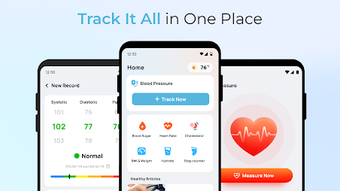

Download Blood Pressure – Health & Fitness, Blood Sugar, Heart Rate Monitoring
Overview
Blood Pressure – Blood Sugar is a free Android application designed to assist users in monitoring key health indicators such as blood pressure, blood sugar levels, and heart rate. Developed by HealthTrack, the app aims to support individuals managing chronic conditions like hypertension and diabetes by offering a centralized platform for logging and tracking vital health data. Its primary purpose is to empower users with insights into their health trends over time, enabling informed lifestyle decisions and better communication with healthcare providers.
The app is tailored for health-conscious individuals, patients managing long-term conditions, and anyone seeking a simple, accessible way to monitor their wellness metrics. Real-world usage scenarios include daily tracking of blood pressure readings before medication, recording blood sugar levels after meals, and monitoring heart rate during physical activity. The inclusion of health-related articles provides educational value, helping users understand the impact of diet, exercise, and stress on their health. While the app integrates real-time weather updates to support daily planning, it is explicitly not intended as a replacement for medical diagnosis or professional healthcare advice. Users are encouraged to consult qualified medical professionals for clinical concerns.
Key Features & Capabilities
- Multi-Metric Tracking: Enables logging of blood pressure, blood sugar, and heart rate with customizable entry fields and date/time stamps for accurate record-keeping.
- Trend Analysis: Offers visual charts and summaries to identify patterns in health data over days, weeks, or months, supporting proactive health management.
- Health Education: Provides access to curated articles on wellness topics, including nutrition, stress reduction, and lifestyle adjustments for better health outcomes.
- Environmental Integration: Displays real-time weather updates, allowing users to correlate environmental conditions with their health metrics, such as how cold weather may affect blood pressure.
- User-Friendly Interface: Features a clean, intuitive layout with easy navigation, making data entry and review accessible even for non-technical users.
These capabilities allow users to maintain a consistent health log, detect anomalies early, and share data with healthcare providers during consultations. The integration of weather data adds a contextual layer, helping users understand how external factors influence their readings. While the app does not include automated alerts or advanced analytics, its straightforward approach makes it ideal for individuals who prefer manual input with clear visualization.
User Interface, Workflow & Performance
The user interface of Blood Pressure – Blood Sugar is structured around a dashboard that displays recent entries, key metrics, and trend graphs. Navigation is handled through a bottom menu bar with clearly labeled icons for logging, viewing history, accessing articles, and checking weather. The workflow emphasizes simplicity: users can input data with minimal taps, and entries are saved instantly with confirmation feedback.
Based on general software behavior patterns, the app is expected to operate smoothly on modern Android devices. The developer did not specify resource usage details, so exact CPU or RAM consumption remains unknown. However, the app’s 25 MB size suggests a lightweight footprint, which typically correlates with efficient performance and minimal battery drain. Stability during extended use has not been publicly documented, but the absence of reported crashes in available sources implies consistent operation under normal conditions. The app does not appear to require constant internet access for core functions, allowing offline data entry and synchronization when connectivity resumes.
Compatibility & System Requirements
Blood Pressure – Blood Sugar is designed for Android operating systems. The app is available in version 1.4.3 and has a file size of 25 MB. While the developer did not provide additional system requirements, it is likely compatible with Android devices running version 6.0 (Marshmallow) or later, as this is standard for most health monitoring apps. Installation is straightforward, requiring only basic permissions for storage and network access to save data and sync across devices.
Exact hardware requirements were not listed. Users should ensure their device meets minimum Android specifications for smooth operation. Compatibility information was partially provided, leaving some aspects of device support undefined. It is recommended to check the app’s official page for the most accurate compatibility details before installation.
Pros and Cons
Pros
- Free to download and use with no in-app purchases or subscription fees
- Supports multiple health metrics: blood pressure, blood sugar, and heart rate
- Intuitive interface suitable for users of all technical skill levels
- Includes educational content to promote health literacy
- Integrates real-time weather data for contextual health insights
Cons
- No automated alerts or reminders for regular readings
- Exact system requirements and performance metrics were not specified
- Does not support data export to external health platforms (e.g., Google Fit, Apple Health)
- Limited customization options for data visualization and reporting
- Not intended as a medical device or diagnostic tool
FAQ Section
Is Blood Pressure – Blood Sugar available for free?
Yes, the app is completely free to download and use. There are no hidden costs, in-app purchases, or subscription models.
Can I use this app without an internet connection?
Yes, core features such as logging readings and viewing historical data can be used offline. Data will sync once a connection is restored.
Is this app safe to use for managing health conditions?
The app is designed as a personal tracking tool and should not replace professional medical advice. Always consult a healthcare provider for diagnosis or treatment.
How often are updates released?
Updates are released periodically by the developer to improve functionality and fix bugs. The current version is 1.4.3, released on May 10, 2024.
What operating systems does it support?
Blood Pressure – Blood Sugar is designed for Android devices. Specific version compatibility is not detailed, but it is expected to work on Android 6.0 and later.
Final Thoughts
Blood Pressure – Blood Sugar stands out as a practical, no-cost solution for individuals seeking to monitor key health indicators on a daily basis. Its clean interface, multi-metric tracking, and educational content make it a valuable companion for users managing hypertension, diabetes, or general wellness. While it lacks advanced automation and integration with third-party health platforms, its simplicity and focus on user empowerment deliver strong utility.
For those who value control over their health data and appreciate straightforward tools without unnecessary complexity, this app offers reliable support. It is particularly well-suited for older adults, patients with chronic conditions, and health-conscious users who prefer manual tracking with visual feedback. The inclusion of weather context adds a thoughtful touch, enhancing the overall user experience.
Download Blood Pressure now and take a proactive step toward better health management.







